

Time Settings
To open this page, go to Settings > Time.
Campaign Scheduling
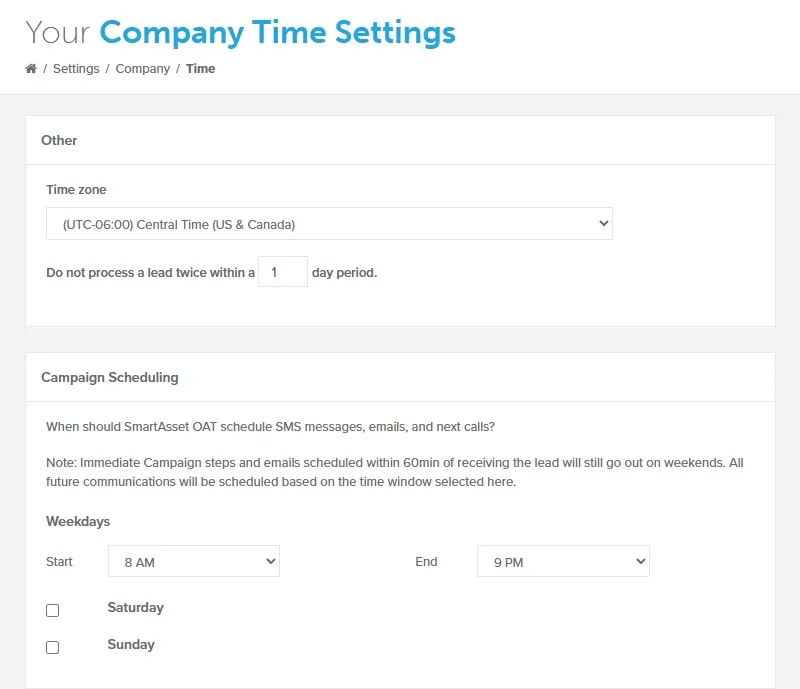
Section titled “Campaign Scheduling”Choose your preferred time window for sending out scheduled emails and text messages. By default, campaign scheduling is set to send follow-up emails and text messages between the hours of 8 AM and 9 PM on weekdays only.
To change your sending window:
- Under Weekdays, select a Start time.
- Select an End time.
- Optional: To send on weekends, select the Saturday or Sunday checkbox. That day’s Start and End times appear, set to 8 AM and 9 PM.
- Optional: Change the weekend day’s Start and End times.
- Click Save. A “Successfully saved.” message appears.
An immediate email goes out as soon as a lead arrives and Lead Sources assigns it a campaign, at any time of day. An immediate text goes out right away if the lead arrives between 8 AM and 9 PM in the lead’s local time. Otherwise, it waits for the start of your next sending window, which is Monday if weekends are off.
The 8 AM to 9 PM limit comes from the Telephone Consumer Protection Act (TCPA), which restricts telemarketing calls and texts outside those hours in the recipient’s local time.
When Does the First Email Send?
Section titled “When Does the First Email Send?”Whether the first campaign email ignores your sending window depends on how the campaign was assigned:
- Automated assignment (a new lead is assigned a campaign through the Lead Sources page): the first email sends immediately, even outside your sending window.
- Manual assignment (assigning a campaign to an existing lead, bulk assigning, or selecting a campaign while importing leads): the first email follows your sending window and is scheduled for the next valid time inside it.